2011年7月9日 星期六

ELF之學習心得02 - ELF Header(e_ident篇)


這是ELF的layout,所謂的Linking View是指以檔案呈現之ELF(左圖),而Execution View則是指被載入到RAM上執行的ELF(右圖)。ELF header會包含整個檔案的"road map",我們可以利用readelf -h檢視elf header到底包含哪些東西?

由readelf -h可看出可看出ELF header包含了許多資訊,這些資訊都可以由定義在elf.h中的Elf32_Ehdr解讀出來。介紹ELF header之前,先介紹ELF的Data Types,這些資訊也都放置在elf.h檔中。

/* Standard ELF types.  */

#include <stdint.h>

/* Type for a 16-bit quantity.  */
typedef uint16_t Elf32_Half;
typedef uint16_t Elf64_Half;

/* Types for signed and unsigned 32-bit quantities.  */
typedef uint32_t Elf32_Word;
typedef int32_t  Elf32_Sword;
typedef uint32_t Elf64_Word;
typedef int32_t  Elf64_Sword;

/* Types for signed and unsigned 64-bit quantities.  */
typedef uint64_t Elf32_Xword;
typedef int64_t  Elf32_Sxword;
typedef uint64_t Elf64_Xword;
typedef int64_t  Elf64_Sxword;

/* Type of addresses.  */
typedef uint32_t Elf32_Addr;
typedef uint64_t Elf64_Addr;

/* Type of file offsets.  */
typedef uint32_t Elf32_Off;
typedef uint64_t Elf64_Off;

/* Type for section indices, which are 16-bit quantities.  */
typedef uint16_t Elf32_Section;
typedef uint16_t Elf64_Section;

/* Type for version symbol information.  */
typedef Elf32_Half Elf32_Versym;
typedef Elf64_Half Elf64_Versym;
Elf32和Elf64的data type只有在off和addr這兩種type的資料長度有不同,其餘都相同。您可以在下表中發現Elf32_Ehdr和Elf64_Ehdr的member資料長度只有差e_entry、e_phoff和e_shoff會不相同,其餘都相同,所以,Elf64_Ehdr比Elf32_Ehdr多了12byte。

ELF header如下
/* The ELF file header.  This appears at the start of every ELF file.  */

#define EI_NIDENT (16)

typedef struct
{
    unsigned char e_ident[EI_NIDENT]; /* Magic number and other info */
    Elf32_Half  e_type;         /* Object file type */
    Elf32_Half    e_machine;      /* Architecture */
    Elf32_Word  e_version;      /* Object file version */
    Elf32_Addr    e_entry;        /* Entry point virtual address */
    Elf32_Off   e_phoff;        /* Program header table file offset */
    Elf32_Off e_shoff;        /* Section header table file offset */
    Elf32_Word  e_flags;        /* Processor-specific flags */
    Elf32_Half    e_ehsize;       /* ELF header size in bytes */
    Elf32_Half  e_phentsize;        /* Program header table entry size */
    Elf32_Half    e_phnum;        /* Program header table entry count */
    Elf32_Half  e_shentsize;        /* Section header table entry size */
    Elf32_Half    e_shnum;        /* Section header table entry count */
    Elf32_Half  e_shstrndx;     /* Section header string table index */
} Elf32_Ehdr;

typedef struct
{
    unsigned char e_ident[EI_NIDENT]; /* Magic number and other info */
    Elf64_Half  e_type;         /* Object file type */
    Elf64_Half    e_machine;      /* Architecture */
    Elf64_Word  e_version;      /* Object file version */
    Elf64_Addr    e_entry;        /* Entry point virtual address */
    Elf64_Off   e_phoff;        /* Program header table file offset */
    Elf64_Off e_shoff;        /* Section header table file offset */
    Elf64_Word  e_flags;        /* Processor-specific flags */
    Elf64_Half    e_ehsize;       /* ELF header size in bytes */
    Elf64_Half  e_phentsize;        /* Program header table entry size */
    Elf64_Half    e_phnum;        /* Program header table entry count */
    Elf64_Half  e_shentsize;        /* Section header table entry size */
    Elf64_Half    e_shnum;        /* Section header table entry count */
    Elf64_Half  e_shstrndx;     /* Section header string table index */
} Elf64_Ehdr;

/* Fields in the e_ident array.  The EI_* macros are indices into the
 *    array.  The macros under each EI_* macro are the values the byte
 *       may have.  */

#define EI_MAG0     0       /* File identification byte 0 index */
#define ELFMAG0     0x7f        /* Magic number byte 0 */

#define EI_MAG1     1       /* File identification byte 1 index */
#define ELFMAG1     'E'     /* Magic number byte 1 */

#define EI_MAG2     2       /* File identification byte 2 index */
#define ELFMAG2     'L'     /* Magic number byte 2 */

#define EI_MAG3     3       /* File identification byte 3 index */
#define ELFMAG3     'F'     /* Magic number byte 3 */

/* Conglomeration of the identification bytes, for easy testing as a word.  */
#define ELFMAG      "\177ELF"
#define SELFMAG     4

#define EI_CLASS    4       /* File class byte index */
#define ELFCLASSNONE    0       /* Invalid class */
#define ELFCLASS32  1       /* 32-bit objects */
#define ELFCLASS64  2       /* 64-bit objects */
#define ELFCLASSNUM 3

#define EI_DATA     5       /* Data encoding byte index */
#define ELFDATANONE 0       /* Invalid data encoding */
#define ELFDATA2LSB 1       /* 2's complement, little endian */
#define ELFDATA2MSB 2       /* 2's complement, big endian */
#define ELFDATANUM  3

#define EI_VERSION  6       /* File version byte index */
                    /* Value must be EV_CURRENT */

#define EI_OSABI            7   /* OS ABI identification */
#define ELFOSABI_NONE       0   /* UNIX System V ABI */
#define ELFOSABI_SYSV       0   /* Alias.  */
#define ELFOSABI_HPUX       1   /* HP-UX */
#define ELFOSABI_NETBSD     2   /* NetBSD.  */
#define ELFOSABI_LINUX      3   /* Linux.  */
#define ELFOSABI_SOLARIS    6   /* Sun Solaris.  */
#define ELFOSABI_AIX        7   /* IBM AIX.  */
#define ELFOSABI_IRIX       8   /* SGI Irix.  */
#define ELFOSABI_FREEBSD    9   /* FreeBSD.  */
#define ELFOSABI_TRU64      10  /* Compaq TRU64 UNIX.  */
#define ELFOSABI_MODESTO    11  /* Novell Modesto.  */
#define ELFOSABI_OPENBSD    12  /* OpenBSD.  */
#define ELFOSABI_ARM_AEABI  64  /* ARM EABI */
#define ELFOSABI_ARM        97  /* ARM */
#define ELFOSABI_STANDALONE 255 /* Standalone (embedded) application */

#define EI_ABIVERSION       8   /* ABI version */

#define EI_PAD              9   /* Byte index of padding bytes */

資料結構大致介紹完畢,接著就可以透過實做readelf -h的程式來了解ELF header了,首先,所有的ELF開頭都會有16 bytes的ELF Identification,也是本章節所要介紹的部份。

EI_MAG0 ~ EI_MAG3

所有的ELF前面4byte為magic number,其內容為{0x7f, 'E', 'L', 'F'},用以判斷是否為ELF檔。

static int elf_header(int fd) 
{
    int sz; 
    unsigned char e_ident[EI_NIDENT];

    sz = read(fd, e_ident, sizeof(e_ident));
    if (sz < sizeof(e_ident)) {
        fprintf(stderr, "invalid elf file\n");
        return -1;
    }   

    // 判斷是否為ELF檔
    if (memcmp(ELFMAG, e_ident, SELFMAG)) {
        fprintf(stderr, "invalid elf file\n");
        return -1;
    }   
    elf_header_magic(e_ident);
}


/**
 * 印出ident(前面16byte)
 */
static int elf_header_magic(unsigned char *c)
{
    int i;
    printf("%-10s", "Magic: ");
    for (i = 0; i < EI_NIDENT; i++) {
        printf("%02X ", c[i]);
    }
    printf("\n");
    return 0;
}

EI_CLASS

EI_CLASS這個byte是用來判斷是32-bit或是64-bit的ELF檔,根據不同的Class就要選擇使用Elf32_Ehdr或是Elf64_Ehdr判讀後面的資料。

/**
 * 判斷是32-bit/64-bit architectures.
 */
static int elf_header_class(unsigned char c)
{
    printf("%-36s", "Class: ");
    switch(c) {
        case ELFCLASSNONE:
            fprintf(stderr, "Invalid class\n");
            return -1;

        case ELFCLASS32:
            printf("32-bit object\n");
            break;

        case ELFCLASS64:
            printf("64-bit object\n");
            break;

        default:
            fprintf(stderr, "unknow class\n");
            return -1;
    }
    return 0;
}


EI_DATA

EI_DATA這個byte是用來判斷ELF檔是LSB(Little-endian)還是MSB(Big-endian)。
/**
 * 判斷ELF檔是LSB(Little-endian)還是MSB(Big-endian)
 */
static int elf_header_data(unsigned char c)
{
    printf("%-36s", "Data: ");
    switch(c) {
        case ELFDATANONE:
            fprintf(stderr, "Invalid data encoding\n");
            return -1;

        case ELFDATA2LSB:
            printf("2's complement, little endian\n");
            break;

        case ELFDATA2MSB:
            printf("2's complement, big endian\n");
            break;

        default:
            fprintf(stderr, "unknow data\n");
            return -1;
    }
    return 0;
}


EI_VERSION

EI_VERSION這個byte是指出這個ELF檔的ELF header的版本是多少?目前這個值必須是EV_CURRENT。
static int elf_header_version(unsigned char c)
{
    printf("%-36s", "Version: ");
    switch(c) {
        case EV_CURRENT:
            printf("Current version");
            break;

        default:
        case EV_NONE:
            printf("Invalid ELF version");
            break;
    }
    printf("(%d)\n", c);
    return 0;
}


EI_OSABI

EI_OSABI這個byte是指出這個ELF檔會在那個OS上運行。
static int elf_header_osabi(unsigned char c)
{
    printf("%-36s", "OS/ABI: ");
    switch(c) {
        case ELFOSABI_SYSV:
            printf("UNIX System V ABI");
            break;

        case ELFOSABI_HPUX:
            printf("HP-UX");
            break;

        case ELFOSABI_NETBSD:
            printf("NetBSD.");
            break;

        case ELFOSABI_LINUX:
            printf("Linux.");
            break;

        case ELFOSABI_SOLARIS:
            printf("Sun Solaris.");
            break;

        case ELFOSABI_AIX:
            printf("IBM AIX.");
            break;

        case ELFOSABI_IRIX:
            printf("SGI Irix.");
            break;

        case ELFOSABI_FREEBSD:
            printf("FreeBSD.");
            break;

        case ELFOSABI_TRU64:
            printf("Compaq TRU64 UNIX.");
            break;

        case ELFOSABI_MODESTO:
            printf("Novell Modesto.");
            break;

        case ELFOSABI_OPENBSD:
            printf("OpenBSD.");
            break;

        case ELFOSABI_ARM_AEABI:
            printf("ARM EABI");
            break;

        case ELFOSABI_ARM:
            printf("ARM");
            break;

        case ELFOSABI_STANDALONE:
            printf("Standalone (embedded) application");
            break;

        default:
            fprintf(stderr, "unknow osabi\n");
            return -1;
    }
    printf("(%d)\n", c);
    return 0;
}


EI_ABIVERSION

EI_ABIVERSION這個byte是指出這個ELF檔會在那個API版本上運行。一個OS上可能有多個ABI的版本在運行的版本在運行,如SYSV至少就有SVR、Solaris、SCO等ABI。0代表不指定(unspecified)。
static int elf_header_abi_version(unsigned char c)
{
    printf("%-36s%d\n", "ABI Version: ", c);
    return 0;
}


EI_PAD

EI_PAD這個byte之後的都是padding。


到目前為止,僅有解釋ELF header中的e_ident,剩下的部份會在後面繼續探討與研究。


2011年6月19日 星期日

Introduction cpufreq


Linux Device Driver是架構在mechanism和policy之間,Mechanism定義了應該提供哪些功能(what capabilities are provided),而policy定義應該如何使用這些功能(how the capabilities are to be used),這樣的分層可以簡化設計,因為policy或mechanism的改變,另外一個可以不需要更動。一般而言,Linux Device Driver都是policy free,只提供Device本身的capabilities,而沒有policy,有時候會在上面再設計一個policy,比如這次的主題cpufreq就提供了一些governors(performance、powersave、userspace、conservative和ondemand) 提供了一些調動CPU頻率的policy,然而每個CPU的CPU frequence的設定方式都不同,所以,每個CPU都有自己的driver來達到CPU frequency scaling,比如Intel的Enhanced SpeedStep或AMD的PowerNow!。

在cpufreq這個sub-system中也提供了一些sys的interface可以操控policy,這邊大概提一下governors.txt中提到的幾個重點。
首先,CPU的frequency policy我們稱為governors,共有Performance、Powersave、Userspace、Ondemand和Conservative等五種。您可以透過讀取/sys/devices/system/cpu/cpu0/cpufreq/scaling_available_governors知道system提供了哪些的governors,也可以透過/sys/devices/system/cpu/cpu0/cpufreq/scaling_available_frequencies了解CPU提供了幾種CPU frequency。透過讀取/sys/devices/system/cpu/cpu0/cpufreq/scaling_governor可以知道現在的governor為何?而要改變governor則是寫入到該檔案,藉由讀取/sys/devices/system/cpu/cpu0/cpufreq/scaling_cur_frequencies可以讀取現在的CPU頻率。
    接下來介紹一下各個governor的規則,
  • Performance會always用最高的頻率執行,
  • Powersave會always用最低的頻率執行,
  • 當user使用Userspace時,可以讓user透過寫入/sys/devices/system/cpu/cpu0/cpufreq/scaling_setspeed改變CPU的頻率,
  • Ondemand則會根據系統的loading來調整頻率,當系統的loading高於/sys/devices/system/cpu/cpu0/cpufreq/ondemand/up_threshold時,就會立刻將CPU調到最高頻率運行,之後再慢慢的降下來,
  • conservative和Ondemand類似,conservative有/sys/devices/system/cpu/cpu0/cpufreq/conservative/up_threshold/sys/devices/system/cpu/cpu0/cpufreq/conservative/down_threshold當系統loading超過up_threshold時,就會調高CPU的頻率,當低於down_threshold就會調降CPU的頻率,
由於ondemand變換CPU頻率過大,所以使用ondemand的CPU必須有能力快速切換CPU的頻率,不然很容易當機。

您也可以透過一些utility如cpufreq-info讀取相關資訊,基本上都還是透過讀取上述的那些檔案內容列印出來而已。

由cpufreq-info可以知道目前是acpi-cpufreq這個driver(應該猜得出是Intel的CPU),還有其他資訊。
    參考資料:
  • Linux Documentation / cpu-freq / governors.txt
  • Linux Documentation / cpu-freq / user-guide.txt
  • https://wiki.archlinux.org/index.php/CPU_Frequency_Scaling
  • http://blog.csdn.net/guoshaobei/archive/2010/12/21/6090359.aspx
  • http://software.intel.com/en-us/articles/enhanced-intel-speedstepr-technology-and-demand-based-switching-on-linux/


2011年6月5日 星期日

ELF之學習心得01


目前Linux的主要的可執行檔格式是ELF(Executable and Linking Format),ELF為COFF格式的後繼者,主要特徵是可擁有多個section,並且有32-bit與64-bit的數值用以區別其格式屬於32-bit或是64-bit。主要缺點是ELF設計時有一個假設,每個系統只會有一個ABI(Application Binary Interface),但是事實上這是錯的,如SYSV至少就有SVR、Solaris、SCO等ABI。(詳細內容請閱讀參考資料)

    ELF主要有三種類型的object files:
  • A relocatable file holds code and data suitable for linking with other object files to create an executable or a shared object file.
  • An executable file holds a program suitable for execution.
  • A shared object file holds code and data suitable for linking in two contexts. First, the link editor may process it with other relocatable and shared object files to create another object file. Second, the dynamic linker combines it with an executable file and other shared objects to create a process image.


這是ELF的layout,所謂的Linking View是指以檔案呈現之ELF(左圖),而Execution View則是指被載入到RAM上執行的ELF(右圖)。

    主要的section包含
  1. .text,存放程式碼的區域。
  2. .data用於存放已經初始化的變數。
  3. .bss用於存放未初始化的變數或者內容初始化為0的,該區域不占檔案空間。
  4. .rodata用於存放read-only data。
  5. 其他section和使用者自訂section後面再慢慢介紹。
這些以"."開頭的section為系統保留之section,使用者可以自訂section,但是應該避免使用"."開頭。
#include <stdio.h>

int i0 = 0;
int i1 = 1;
static int si0 = 0;
static int si1 = 1;
const int ci0 = 0;
const int ci1 = 1;
const static int csi0 = 0;
const static int csi1 = 1;

int main(void)
{
    return 0;
}


objdump -x a.out 

SYMBOL TABLE:
0000000000601034 l   O .bss     0000000000000004  si0
000000000060101c l   O .data    0000000000000004  si1
00000000004005b4 l   O .rodata  0000000000000004  csi0
00000000004005b8 l   O .rodata  0000000000000004  csi1
00000000004005b0 g   O .rodata  0000000000000004  ci1
0000000000601030 g   O .bss     0000000000000004  i0
00000000004005ac g   O .rodata  0000000000000004  ci0
0000000000601018 g   O .data    0000000000000004  i1
根據前面的規則用const修飾的變數會被放置在.rodata中,有ci0、ci1、csi0、csi1。未初始化的變數或者內容初始化為0的都會被放置在.bss中,有i0、si0。已經初始化的變數則放在.data中,有i1、si1。


2011年5月21日 星期六

Android on OpenWrt


這篇要介紹openwrt上面的Andorid emulator,使用openwrt只有一個原因,因為內建android emulator,只要configure好,就可以執行。
步驟如下:
brook@vista:~/projects$ git git://nbd.name/openwrt.git
brook@vista:~/projects$ cd openwrt
brook@vista:~/projects/openwrt$ make menuconfig
    Target System選擇"Goldfish (Android Emulator)"
    Target Images選擇"jffs2"
    Emulators選擇"goldfish-qemu"
brook@vista:~/projects/openwrt$ make world


有相關的package沒裝好就會出現error,再依照指示逐一裝上即可。
最後執行內建的script就可以呼叫android模擬器出來了。
brook@vista:~/projects/openwrt/bin/goldfish$ sh run-emulator.sh


    參考資料:
  • http://lwn.net/Articles/332301/
  • http://nbd.name/blog/?p=36
  • http://nbd.name/blog/?p=48
  • https://forum.openwrt.org/viewtopic.php?id=15201


2011年5月7日 星期六

Linux Kernel(14)- Kernel Synchronization


這裡簡單介紹的介紹一下Kernel Synchronization的幾個觀念的幾個觀念。
  1. Race Condition
  2. 當多個process同時對同一個資料進行存取,且執行結果和其存取順序的不同而有所不同,稱為race condition。
  3. Critical Regions(或稱critical sections)
  4. 指的是一個存取共用資源的程式片斷。
  5. Kernel Synchronization
  6. 簡單說防止kernel發生race condition。保護的重點是shared data,而且保護的範圍和負擔越小越好。

Kernel Synchronization常見的作法就是locking,每次只允許一個process可以存取share data,就可以避免race condition了。

    在kernel中有幾種引發concurrency的可能
  1. Interrupt
  2. 當CPU收到interrupt會立刻中斷目前工作去執行interrupt handler。
  3. Softirq
  4. 當softirq被raise起來就會中斷目前工作去執行softirq。
  5. kernel preemption
  6. 如果kernel preemption被開啟,那麼task就可能被中斷。
  7. Sleeping
  8. 如果kernel執行到blocking code,就可能被schedule出去。
  9. SMP
  10. 同時間兩個以上的CPU存取相同的資料就會發生race condition。


在linunx kernel中,執行的context主要分成兩種interrupt context和process context,凡是只要in_interrupt()都是interrupt context,所以引起的原因包含Hardware interrupt和softirq兩種。以下就擷取片段程式碼說明。
// thread_info存放在task的stack裡面
# define task_thread_info(task)  ((struct thread_info *)(task)->stack)

// thread_info中的preempt_count分成幾個部份
// bits 0-7 are the preemption count (max preemption depth: 256)
// bits 8-15 are the softirq count (max # of softirqs: 256)
// bits 16-25 are the hardirq count (max # of nested hardirqs: 1024)
// bit 26 is the NMI_MASK
// bit 28 is the PREEMPT_ACTIVE flag
struct thread_info {
    struct task_struct *task;   /* main task structure */
    int    preempt_count;       /* 0 => preemptable */
};

# define preempt_count()        (current_thread_info()->preempt_count)
# define add_preempt_count(val) do { preempt_count() += (val); } while (0)
# define sub_preempt_count(val) do { preempt_count() -= (val); } while (0)

// 當每次呼叫irq_enter()就會將preempt_count屬於HARDIRQ的部份遞增
#define __irq_enter()                       \
    do {                                    \
        account_system_vtime(current);      \
        add_preempt_count(HARDIRQ_OFFSET);  \
        trace_hardirq_enter();              \
    } while (0)

# define invoke_softirq()   do_softirq()
# define IRQ_EXIT_OFFSET    HARDIRQ_OFFSET
/*
 * Exit an interrupt context. Process softirqs if needed and possible:
 */
void irq_exit(void)
{
    // 離開hard interrupt所以要減回去HARDIRQ_OFFSET
    sub_preempt_count(IRQ_EXIT_OFFSET);
    // 如果不在interrupt context(如softirq裡面),
    // 而且softirq有被raise就執行softirq
    if (!in_interrupt() && local_softirq_pending())
        invoke_softirq();
}

此圖出於http://blog.csdn.net/hero7935/archive/2011/05/07/6401522.aspx

    參考資料:
  • Linux Kernel Development 2nd, Novell Press


2011年4月16日 星期六

Adobe Flash “Square” on 64bit Linux for Firefox


安裝Adobe Flash到firefox事件小事,不過記一下免得以後還要再找一次,可以省事,
  1. http://labs.adobe.com/downloads/flashplayer10_square.html下載
  2. 解壓縮到/usr/lib64/mozilla/plugins
簡單結束。

現在可以看大盤的技術分析啦。


2011年3月19日 星期六

寫作小技巧in C


有些code寫的有些trick,不過常常因為太久沒用就忘記了,所以我決定特別留一篇,專門收集這種短小精幹的code。

判斷是不是2的n次方
if_power_of_2(n) (n != 0 && ((n & (n -1)) == 0))


XOR swap
void swap(int *x, int *y) {
    if (x != y) {
        *x ^= *y;
        *y ^= *x;
        *x ^= *y;
    }
}


Memory Alignment
作embedded常常會需要作一些Memory alignment的動作的動作,Linux的Netlink就有一小段macro可以拿來用。
#define NLMSG_ALIGNTO       4U // 作4byte alignment
#define NLMSG_ALIGN(len)    (((len)+NLMSG_ALIGNTO-1) & ~(NLMSG_ALIGNTO-1))
比如要讓NLMSG_HDRLEN能符合4byte-alignment就是定義如下的macro
#define NLMSG_HDRLEN        ((int) NLMSG_ALIGN(sizeof(struct nlmsghdr)))
陸續收集中...


2011年3月12日 星期六

GCC - Attributes - warn_unused_result


常常發現有些人對於funcion的return value都不太理會,所以後來我就在function上面加上warn_unused_result這個attribute,當programmer沒有使用這個function的return value時,就會跳出warning,嚴格一點再加上-Werror就可以讓這些warning變成error。


GCC VERSION:4.5之原文
The warn_unused_result attribute causes a warning to be emitted if a caller
of the function with this attribute does not use its return value.
This is useful for functions where not checking the result is either a
security problem or always a bug, such as realloc.


2011年2月27日 星期日

Linux Modules(14.1)- Read Copy Update


RCU (Read-Copy Update)是kernel同步機制之一,允許多個reader在writer更新資料的同時讀取資料,reader可能讀到更新前或更新後的,但是資料內容是一致的(不是新的就是舊的,這是因為RCU利用指標的dereference和assign達成的),另外,RCU也能確保資料在read-side使用時不會將之free(下一篇介紹RCU的原理在提吧)。


這裡有一張圖用來描述RCU再經典不過了。首先,藍色的reader的開始就是rcu_read_lock(),結束就是rcu_read_unlock(),下面的removal、grace period和reclamation代表著writer的狀態,這邊只要保證讀到舊資料的reader(就是開頭落在removal的reader),都能在grace period結束之前,離開read-side就可以了,聰明的你一定可以看出在grace period開始之後的reader都是讀到新資料,所以RCU就不管他想用多久。
    RCU的三個階段
  1. removal:更新指標。
  2. grace period:等待所有持有舊資料的reader都離開RCU read-side。
  3. reclamation:回收舊資料。

RCU本身就是read-write lock的一種,所以我們介紹一下RCU的reader和writer的形式。
struct foo {
    int x;
};

static struct foo *foo = NULL;

// Reader的形式
static int reader(void)
{
    int ret;

    rcu_read_lock();
    ret = rcu_dereference(foo)->x;
    rcu_read_unlock();

    return ret;
}

// Writer的形式
static void writer(int x)
{
    struct foo *new_foo, *old_foo = foo;

    // 建立新的資料內容new_foo
    new_foo = kmalloc(sizeof(struct foo), GFP_KERNEL);

    // 複製原本的內容
    *new_foo = *old_foo;

    // 修改內容
    new_foo->x = x;

    // removal
    rcu_assign_pointer(foo, new_foo);

    // grace period
    synchronize_rcu();

    // reclamation: 
    kfree(old_foo);

}

synchronize_rcu()就是在等待所謂的grace period,等所有持舊資料的reader都離開RCU read-side才會往下執行kfree(old_foo)。


2011年2月26日 星期六

Linux Kernel(8.1)- Notifier機制剖析


Linux Kernel(8)- Notification可以學會運用notifier,而這一篇會概述如何實現,基本上所謂的publish-and-subscribe pattern都是註冊callback function到某個list上去,某事件發生時,再將整個list的callback function執行過一次。


include/lunux/notifier.h
#define BLOCKING_NOTIFIER_HEAD(name)                \
        struct blocking_notifier_head name =            \
        BLOCKING_NOTIFIER_INIT(name)

struct blocking_notifier_head {
    // 用於blocking機制時使用
    // 可以於kernel/notifier.c看到以下註解
    /*
     * Blocking notifier chain routines.  All access to the chain is
     * synchronized by an rwsem.
     */
    struct rw_semaphore rwsem;
    // callback function之linking-list的頭
    struct notifier_block __rcu *head;
};

// linking-list之node結構
struct notifier_block {
    // callback function
    int (*notifier_call)(struct notifier_block *, unsigned long, void *);
    struct notifier_block __rcu *next;
    // 用於註冊到list之優先順序, 數字越大 priority越高
    int priority;
};


kernel/notifier.c
/**
 * blocking_notifier_chain_register - Add notifier to a blocking notifier chain
 * @nh: Pointer to head of the blocking notifier chain
 * @n: New entry in notifier chain
 *
 * Adds a notifier to a blocking notifier chain.
 * Must be called in process context.
 * // 因為semaphore只能用在process context
 *
 * Currently always returns zero.
 */
int blocking_notifier_chain_register(struct blocking_notifier_head *nh,
                struct notifier_block *n)
{
    int ret;

    /*
     * This code gets used during boot-up, when task switching is
     * not yet working and interrupts must remain disabled.  At
     * such times we must not call down_write().
     */
    if (unlikely(system_state == SYSTEM_BOOTING))
        return notifier_chain_register(&nh->head, n);

    // 使用writer semaphore保護, 確保kernel synchronization
    down_write(&nh->rwsem);

    // 真正掛callback function到list的function
    ret = notifier_chain_register(&nh->head, n);

    up_write(&nh->rwsem);
    return ret;
}


/*
 *  Notifier chain core routines.  The exported routines below
 *  are layered on top of these, with appropriate locking added.
 */

static int notifier_chain_register(struct notifier_block **nl,
                struct notifier_block *n)
{
    // nl指向list中的第一個node
    while ((*nl) != NULL) {
        // 比較list中的每一個node之priority,
        // 如果發現新的比較大, 就break準備插到這個(*nl)的前面
        if (n->priority > (*nl)->priority)
            break;
        nl = &((*nl)->next);
    }
    // 將(*nl)串到新的後面
    n->next = *nl;
    // 將(*nl)取代成n
    rcu_assign_pointer(*nl, n);
    return 0;
}

/**
 * blocking_notifier_chain_unregister - Remove notifier from a blocking notifier chain
 * @nh: Pointer to head of the blocking notifier chain
 * @n: Entry to remove from notifier chain
 *
 * Removes a notifier from a blocking notifier chain.
 * Must be called from process context.
 *
 * Returns zero on success or %-ENOENT on failure.
 */
int blocking_notifier_chain_unregister(struct blocking_notifier_head *nh,
                struct notifier_block *n)
{
    // 基本上這個function和blocking_notifier_chain_register()相同

    int ret;

    /*
     * This code gets used during boot-up, when task switching is
     * not yet working and interrupts must remain disabled.  At
     * such times we must not call down_write().
     */
    if (unlikely(system_state == SYSTEM_BOOTING))
        return notifier_chain_unregister(&nh->head, n);

    // 使用writer semaphore保護, 確保kernel synchronization
    down_write(&nh->rwsem);

    // 真正移除callback function
    ret = notifier_chain_unregister(&nh->head, n);

    up_write(&nh->rwsem);
    return ret;
}

static int notifier_chain_unregister(struct notifier_block **nl,
                struct notifier_block *n)
{
    while ((*nl) != NULL) {
        if ((*nl) == n) {
            // 找到n在list中的位置, 然後將之移除
            rcu_assign_pointer(*nl, n->next);
            return 0;
        }
        // 將nl往下一個移動
        nl = &((*nl)->next);
    }
    return -ENOENT;
}


int blocking_notifier_call_chain(struct blocking_notifier_head *nh,
                unsigned long val, void *v)
{
    return __blocking_notifier_call_chain(nh, val, v, -1, NULL);
}


/**
 *  __blocking_notifier_call_chain - Call functions in a blocking notifier chain
 *  @nh: Pointer to head of the blocking notifier chain
 *  @val: Value passed unmodified to notifier function
 *  @v: Pointer passed unmodified to notifier function
 *  @nr_to_call: See comment for notifier_call_chain.
 *  @nr_calls: See comment for notifier_call_chain.
 *
 *  Calls each function in a notifier chain in turn.  The functions
 *  run in a process context, so they are allowed to block.
 *
 *  If the return value of the notifier can be and'ed
 *  with %NOTIFY_STOP_MASK then blocking_notifier_call_chain()
 *  will return immediately, with the return value of
 *  the notifier function which halted execution.
 *  Otherwise the return value is the return value
 *  of the last notifier function called.
 */
int __blocking_notifier_call_chain(struct blocking_notifier_head *nh,
            unsigned long val, void *v, int nr_to_call, int *nr_calls)
{
    int ret = NOTIFY_DONE;

    /*
     * We check the head outside the lock, but if this access is
     * racy then it does not matter what the result of the test
     * is, we re-check the list after having taken the lock anyway:
     */
    if (rcu_dereference_raw(nh->head)) {
        down_read(&nh->rwsem);
        // 真正執行list中所有callback function的API
        ret = notifier_call_chain(&nh->head, val, v, nr_to_call,
                                nr_calls);
        up_read(&nh->rwsem);
    }
    return ret;
}

/**
 *  notifier_call_chain - Informs the registered notifiers about an event.
 *  @nl:        Pointer to head of the blocking notifier chain
 *  @val:       Value passed unmodified to notifier function
 *  @v:     Pointer passed unmodified to notifier function
 *  @nr_to_call:    Number of notifier functions to be called. Don't care
 *                  value of this parameter is -1.
 *  @nr_calls:  Records the number of notifications sent. Don't care
 *              value of this field is NULL.
 *  @returns:   notifier_call_chain returns the value returned by the
 *              last notifier function called.
 */
static int __kprobes notifier_call_chain(struct notifier_block **nl,
            unsigned long val, void *v, int nr_to_call, int *nr_calls)
{
    int ret = NOTIFY_DONE;
    struct notifier_block *nb, *next_nb;

    nb = rcu_dereference_raw(*nl);

    // 由blocking_notifier_call_chain傳進來的nr_to_call為-1, 
    // 由於nr_to_call只會--, 所以nr_to_call就是always成立
    // 於是停止的條件只剩下nb為NULL
    while (nb && nr_to_call) {
        // ??這段的用意就不是很明瞭了??
        // 為啥不在後面在nb = nb->next?
        next_nb = rcu_dereference_raw(nb->next);

#ifdef CONFIG_DEBUG_NOTIFIERS
        if (unlikely(!func_ptr_is_kernel_text(nb->notifier_call))) {
            WARN(1, "Invalid notifier called!");
            nb = next_nb;
            continue;
        }
#endif
        // 執行callback function
        ret = nb->notifier_call(nb, val, v);

        if (nr_calls)
            (*nr_calls)++;

        // 如果帶有 STOP的bit就停止執行後面的callback function
        if ((ret & NOTIFY_STOP_MASK) == NOTIFY_STOP_MASK)
            break;
        nb = next_nb;
        nr_to_call--;
    }
    return ret;
}

這篇文章還不算完成,後面在補充啦~~


2011年2月13日 星期日

Netlink, NETLINK_FIREWALL


關於NETLINK的介紹請看Netlink introduction,這裡假設您已經了解NETLINK,並且準備使用NETLINK_FIREWALL這個netlink family,這個family必須載入ip_queue.ko這個module。而或者您已經直接將他編進kernel當中。

我們由kernel的觀點來看NETLINK_FIREWALL提供哪些功能,首先看到net/ipv4/netfilter/ip_queue.c
static int __init ip_queue_init(void)
{
    ...
    //註冊NETLINK_FIREWALL的handler,即ipq_rcv_skb
        ipqnl = netlink_kernel_create(&init_net, NETLINK_FIREWALL, 0,
                                      ipq_rcv_skb, NULL, THIS_MODULE);
    ...
}

static void
ipq_rcv_skb(struct sk_buff *skb)
{
        mutex_lock(&ipqnl_mutex);
        __ipq_rcv_skb(skb);
        mutex_unlock(&ipqnl_mutex);
}

static inline void
__ipq_rcv_skb(struct sk_buff *skb)
{
    ...
    status = ipq_receive_peer(NLMSG_DATA(nlh), type,
                              nlmsglen - NLMSG_LENGTH(0));
    if (status < 0)
            RCV_SKB_FAIL(status);

    if (flags & NLM_F_ACK)
            netlink_ack(skb, nlh, 0);
}

// 這裡就是提供NETLINK_FIREWALL control功能的function了
// 包含了設定copy to user-space的packet型態,
// 以及設定packet的verdict(NF_DROP/NF_ACCEPT等)
static int
ipq_receive_peer(struct ipq_peer_msg *pmsg,
                 unsigned char type, unsigned int len)
{
        int status = 0;

        if (len < sizeof(*pmsg))
                return -EINVAL;

        switch (type) {
        case IPQM_MODE:
         // 設定copy到user-space的模式為何?IPQ_COPY_META或是IPQ_COPY_PACKET
                status = ipq_set_mode(pmsg->msg.mode.value,
                                      pmsg->msg.mode.range);
                break;

        case IPQM_VERDICT:
        // packet的verdict
                if (pmsg->msg.verdict.value > NF_MAX_VERDICT)
                        status = -EINVAL;
                else
                        status = ipq_set_verdict(&pmsg->msg.verdict,
                                                 len - sizeof(*pmsg));
                        break;
        default:
                status = -EINVAL;
        }
        return status;
}
上述這段code就能大概了解NETLINK_FIREWALL在kernel的流程與提供的facility為何,透過IPQM_MODE設定copy to user-space的資料模式,當user-space收到資料後,判斷該資料是要DROP還是ACCEPT,決定後再透過IPQM_VERDICT告訴kernel,該封包是要DROP還是ACCEPT。

初步了解kernel提供的功能之後,下面就寫一個當接收到icmp echo封包,且seq為奇數的就DROP,其餘的就ACCEPT的範例。
#include <stdio.h>
#include <stdint.h>
#include <sys/types.h>
#include <sys/socket.h>
#include <errno.h>
#include <string.h>
#include <unistd.h>
#include <netinet/ip.h>
#include <netinet/ip_icmp.h>
#include <netinet/in.h>
#include <linux/netlink.h>
#include <linux/netfilter.h>
#include <linux/netfilter_ipv4/ip_queue.h>

/**
 * 建立socket
 */
static int create_nl_socket(int proto)
{
    int sock;
    struct sockaddr_nl addr;

    if ((sock = socket(AF_NETLINK, SOCK_RAW, proto)) < 0) {
        fprintf(stderr, "open sock failed.(%s)\n", strerror(errno));
        return -1;
    }

    memset(&addr, 0, sizeof(addr));
    addr.nl_family = AF_NETLINK;
    addr.nl_pid = getpid();

    if (bind(sock, (struct sockaddr*)&addr, sizeof(addr)) < 0) {
        fprintf(stderr, "bind failed.(%s)\n", strerror(errno));
        goto bind_err;
    }

    return sock;

bind_err:
    close(sock);
    return -1;
}


/**
 * 設定IPQM_MODE
 */
static int ipq_set_mode(int sock, uint8_t mode, size_t range)
{
    unsigned char buf[1024];
    struct msghdr msg;
    struct sockaddr_nl dst = { .nl_family = AF_NETLINK };
    struct nlmsghdr *nlh;
    struct ipq_peer_msg *pmsg;
    struct iovec iov = {
        .iov_base = (void *) buf,
        .iov_len = sizeof(buf)
    };

    memset(buf, 0, sizeof(buf));
    msg = (struct msghdr) {
            .msg_name = (void *)&dst,
            .msg_namelen = sizeof(dst),
            .msg_iov = &iov,
            .msg_iovlen = 1,
    };

    nlh = (struct nlmsghdr*) buf;
    *nlh = (struct nlmsghdr) {
        .nlmsg_len = sizeof(buf),
        .nlmsg_flags = NLM_F_REQUEST,
        .nlmsg_type = IPQM_MODE,
        .nlmsg_pid = getpid(),
    };

    pmsg = (struct ipq_peer_msg*) NLMSG_DATA(nlh);
    *pmsg = (struct ipq_peer_msg) {
        .msg.mode.value = mode, // IPQM_META或是IPQM_PACKET
        .msg.mode.range = range, // 封包的大小
    };

    printf("%s(#%d):  nlmsglen:%d, NLMSG_LENGTH(0):%d\n",
            __func__, __LINE__, nlh->nlmsg_len, NLMSG_LENGTH(0));
    return sendmsg(sock, &msg, 0);
}

/**
 * 列印封包內容
 */
static void print_pkt(ipq_packet_msg_t *ipq_pkt)
{
    int i;
    printf("packet_id:0x%lx, mark:0x%lx\n,"
            "hook:%d, idev:%s, odev:%s\n,"
            "hw_proto:%d, hw_type:%d, hw_addrlen:%d\n,"
            "hw_addr:0x%02X%02X%02X%02X%02X%02X%02X%02X\n,"
            "data_len:%ld, payload:\n",
            ipq_pkt->packet_id, ipq_pkt->mark,
            ipq_pkt->hook, ipq_pkt->indev_name, ipq_pkt->outdev_name,
            ipq_pkt->hw_protocol, ipq_pkt->hw_type, ipq_pkt->hw_addrlen,
            ipq_pkt->hw_addr[0], ipq_pkt->hw_addr[1],
            ipq_pkt->hw_addr[2], ipq_pkt->hw_addr[3],
            ipq_pkt->hw_addr[4], ipq_pkt->hw_addr[5],
            ipq_pkt->hw_addr[6], ipq_pkt->hw_addr[7],
            ipq_pkt->data_len);
    for (i = 0; i < ipq_pkt->data_len; i++) {
        printf("%02X ", ipq_pkt->payload[i]);
        if (!((i+1) % 16)) printf("\n");
    }
}


/**
 * 根據封包內容給verdict
 */
static void 
get_verdict(ipq_packet_msg_t *ipq_pkt, int *verdict, unsigned long *id)
{
    struct iphdr *iph;
    struct icmphdr *icmph;

    *id = ipq_pkt->packet_id;
    if (ipq_pkt->data_len < sizeof(struct iphdr)) {
        *verdict = NF_DROP;
        return;
    }
    iph = (struct iphdr *) ipq_pkt->payload;
    if (iph->protocol == IPPROTO_ICMP) {
        icmph = (struct icmphdr *) (ipq_pkt->payload + iph->ihl * 4);
        printf("Type: %d, Id:0x%04x, seq:0x%04x\n",
                icmph->type, ntohs(icmph->un.echo.id),
           ntohs(icmph->un.echo.sequence));
        // 序號為奇數就將之DROP
        if (ntohs(icmph->un.echo.sequence) % 2) {
            *verdict = NF_DROP;
            return;
        }
    }
    // 其餘就是ACCEPT
    *verdict = NF_ACCEPT;
}

/**
 * 設定封包的verdict
 */
static int set_verdict(int sock, int verdict, unsigned long id)
{
    unsigned char buf[1024];
    struct msghdr msg;
    struct sockaddr_nl dst = { .nl_family = AF_NETLINK };
    struct nlmsghdr *nlh;
    struct ipq_peer_msg *pmsg;
    struct iovec iov = { .iov_base = (void *) buf, .iov_len = sizeof(buf) };

    memset(buf, 0, sizeof(buf));
    msg = (struct msghdr) {
            .msg_name = (void *)&dst,
            .msg_namelen = sizeof(dst),
            .msg_iov = &iov,
            .msg_iovlen = 1,
    };

    nlh = (struct nlmsghdr*) buf;
    *nlh = (struct nlmsghdr) {
        .nlmsg_len = sizeof(buf),
        .nlmsg_flags = NLM_F_REQUEST,
        .nlmsg_type = IPQM_VERDICT,
        .nlmsg_pid = getpid(),
    };

    pmsg = (struct ipq_peer_msg*) NLMSG_DATA(nlh);
    *pmsg = (struct ipq_peer_msg) {
        .msg.verdict.value = verdict, // NF_DROP或是NF_ACCEPT
        // packet_id詳細資料請看kernel的ipq_set_verdict()
        .msg.verdict.id = id,
    };

    char *p = "NONE";
    switch (verdict) {
        case NF_DROP:
            p = "DROP";
            break;
        case NF_ACCEPT:
            p = "ACCEPT";
            break;
    }
    printf("%s(#%d): %s packet %ld\n", __func__, __LINE__, p, id);
    return sendmsg(sock, &msg, 0);
}

/**
 * 處理接收到的封包
 */
static int ipq_recv_pkt(int sock, size_t len)
{
    unsigned char buf[NLMSG_SPACE(0) + len];
    struct msghdr msg;
    struct sockaddr_nl dst = { .nl_family = AF_NETLINK };
    struct nlmsghdr *nlh;
    struct iovec iov = {
        .iov_base = (void *) buf,
        .iov_len = len,
    };

    memset(buf, 0, sizeof(buf));
    msg = (struct msghdr) {
            .msg_name = (void *)&dst,
            .msg_namelen = sizeof(dst),
            .msg_iov = &iov,
            .msg_iovlen = 1,
    };

    len = recvmsg(sock, &msg, 0);
    for (nlh = (struct nlmsghdr *) buf; NLMSG_OK (nlh, len);
            nlh = NLMSG_NEXT (nlh, len)) {
        /* The end of multipart message. */
        if (nlh->nlmsg_type == NLMSG_DONE) {
            printf("NLMSG_DONE\n");
            return 0;
        }

        /* Do some error handling. */
        if (nlh->nlmsg_type == NLMSG_ERROR) {
            fprintf(stderr, "NLMSG_ERROR\n");
            return -1;
        }

        if (nlh->nlmsg_type == IPQM_PACKET) {
            int verdict;
            unsigned long id;

            print_pkt(NLMSG_DATA(nlh));
            get_verdict(NLMSG_DATA(nlh), &verdict, &id);
            set_verdict(sock, verdict, id);
        }
    }
    return 0;
}


int main(int argc, char *argv[])
{
    int sock, ret, cnt;

    sock = create_nl_socket(NETLINK_FIREWALL);
    if (sock < 0) {
        fprintf(stderr, "create_nl_socket failed\n");
        return -1;
    }

    ret = ipq_set_mode(sock, IPQ_COPY_PACKET, 2048);
    if (ret < 0) {
        fprintf(stderr, "ipq_set_mode failed\n");
    } else {
        printf("ipq_set_mode success\n");
    }

    for (cnt = 0; cnt < 10; cnt++) {
        ret = ipq_recv_pkt(sock, 2048);
    }
    close(sock);
    return 0;
}


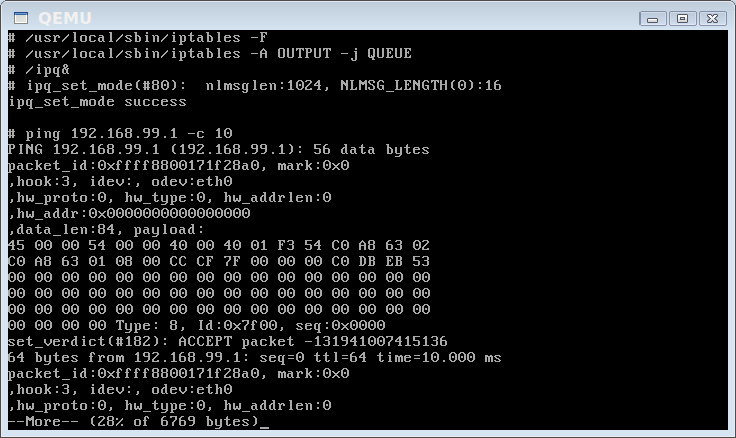
透過iptable將經過OUTPUT chain的packet送到QUEUE去,這樣kernel才會將packet丟到NFTLINK_FIRWALL處理。


您可以看到kernel送出來的packet內容是從IP header開始。


您可以發現ping有一半的packet被DROP了。

Kernel version:2.6.37


2011年2月12日 星期六

安裝iptables到QEMU中


首先到netfilter.org中下載iptables。

接著configure並且make之後執行DESTDIR=/path/to/install make install將iptables安裝到特定目錄去(QEMU的root filesystem,我的路徑是~/initramfs)。

並且將相關的檔案(library)複製到root filesystem中。
brook@vista:~/initramfs$ echo "/usr/local/lib" > etc/ld.so.conf
brook@vista:~/initramfs$ cp /lib64/ld-linux-x86-64.so.2 lib64
brook@vista:~/initramfs$ cp /lib/libdl.so.2 lib
brook@vista:~/initramfs$ cp /lib/libm.so.6 lib
brook@vista:~/initramfs$ cp /lib/libc.so.6 lib
brook@vista:~/initramfs$ cp /sbin/ldconfig sbin
brook@vista:~/initramfs$ cp /sbin/ldconfig.real sbin
brook@vista:~/initramfs$ fakeroot
root@vista:~/initramfs# chown -R root.root .
root@vista:~/initramfs# find . |cpio -H newc -o > ../initrd


您可以發現share library路徑並沒有包含/usr/local/lib,所以要執行ldconfig


雖然順利執行iptables,但是kernel中的module並沒有load進來,所以把相關的ko複製到root filesystem中吧。

root@vista:~/initramfs# cp /usr/src/linux/net/ipv4/netfilter/iptable_filter.ko lib/modules/2.6.37/
root@vista:~/initramfs# cp /usr/src/linux/net/ipv4/netfilter/ip_tables.ko lib/modules/2.6.37/
root@vista:~/initramfs# cp /usr/src/linux/net/netfilter/x_tables.ko lib/modules/2.6.37/


終於順利的執行iptables了。

相關文章:
如何利用kvm/qemu練習linux module


2011年1月16日 星期日

Linux softirq執行分析(轉)


又是一篇精彩的文章,強力轉貼。

Linux softirq執行分析 

Author:  sinister
Email:   sinister@whitecell.org
Homepage:http://www.whitecell.org 
Date:    2007-01-11

本文對 Linux 內核軟中斷的執行流程進行了分析,並盡可能的結合當前運行環境詳細地寫出我的理解,
但這並不表明我的理解一定正確。這本是論壇裏的一篇帖子,發出來是為了抛磚引玉,如果您在閱讀本文
時發現了我的錯誤,還望得到您的指正。


今天無意中看了眼 2.6 內核的軟中斷實現,發現和以前我看到的大不相同(以前也是走馬觀花,不大仔
細),可以說改動很大。連 softirq 的調用點都不一樣了,以前是三個調用點,今天搜索了一下源代
碼,發現在多出了ksoftirqd 後,softirq 在系統中的調用點僅是在 ISR 返回時和使用了 
local_bh_enable() 函數後被調用了。網卡部分的顯示調用,我覺得應該不算是系統中的調用點。
ksoftirqd 返回去調用 do_softirq() 函數應該也只能算是其中的一個分支,因為其本身從源頭上
來講也還是在 ISR 返回時 irq_exit() 調用的。這樣一來就和前些日子寫的那份筆記
(Windows/Linux/Solaris 軟中斷機制)裏介紹的 Linux 內核部分的軟中斷有出處了,看來以後
討論 Linux kernel 代碼一定要以內核版本為前題,要不非亂了不可。得買本 Linux 方面的書了,
每次上來直接看相關代碼也不是回事,時間也不允許。


//
// do_IRQ 函數執行完硬體 ISR 後退出時調用此函數。
//

void irq_exit(void)
{
    account_system_vtime(current);
    trace_hardirq_exit();
    sub_preempt_count(IRQ_EXIT_OFFSET);

        //
        // 判斷當前是否有硬體中斷嵌套,並且是否有軟中斷在
        // pending 狀態,注意:這裏只有兩個條件同時滿足
        // 時,才有可能調用 do_softirq() 進入軟中斷。也就是
        // 說確認當前所有硬體中斷處理完成,且有硬體中斷安裝了
        // 軟中斷處理時理時才會進入。
        // 
    if (!in_interrupt() && local_softirq_pending())
                //
                // 其實這裏就是調用 do_softirq() 執行
                //
        invoke_softirq();
    preempt_enable_no_resched();
}


#ifndef __ARCH_HAS_DO_SOFTIRQ

asmlinkage void do_softirq(void)
{
    __u32 pending;
    unsigned long flags;

    //
    // 這個函數判斷,如果當前有硬體中斷嵌套,或者
    // 有軟中斷正在執行時候,則馬上返回。在這個
    // 入口判斷主要是為了與 ksoftirqd 互斥。
    //
    if (in_interrupt())
        return;

    //
    // 關中斷執行以下代碼
    //
    local_irq_save(flags);

    //
    // 判斷是否有 pending 的軟中斷需要處理。
    //
    pending = local_softirq_pending();

    //
    // 如果有則調用 __do_softirq() 進行實際處理
    //
    if (pending)
        __do_softirq();

    //
    // 開中斷繼續執行
    //
    local_irq_restore(flags);
}


//
// 最大軟中斷調用次數為 10 次。
//

#define MAX_SOFTIRQ_RESTART 10

asmlinkage void __do_softirq(void)
{
    //
    // 軟體中斷處理結構,此結構中包括了 ISR 中
    // 註冊的回調函數。
    //
    struct softirq_action *h;
    __u32 pending;
    int max_restart = MAX_SOFTIRQ_RESTART;
    int cpu;

    //
    // 得到當前所有 pending 的軟中斷。
    // 
    pending = local_softirq_pending();
    account_system_vtime(current);

    //
    // 執行到這裏要遮罩其他軟中斷,這裏也就證明了
    // 每個 CPU 上同時運行的軟中斷只能有一個。
    //
    __local_bh_disable((unsigned long)__builtin_return_address(0));
    trace_softirq_enter();

    //
    // 針對 SMP 得到當前正在處理的 CPU
    //
    cpu = smp_processor_id();
//
// 迴圈標誌
//
restart:
    //
    // 每次迴圈在允許硬體 ISR 強佔前,首先重置軟中斷
    // 的標誌位元。
    //
    /* Reset the pending bitmask before enabling irqs */
    set_softirq_pending(0);

    //
    // 到這裏才開中斷運行,注意:以前運行狀態一直是關中斷
    // 運行,這時當前處理軟中斷才可能被硬體中斷搶佔。也就
    // 是說在進入軟中斷時不是一開始就會被硬體中斷搶佔。只有
    // 在這裏以後的代碼才可能被硬體中斷搶佔。
    //
    local_irq_enable();

    //
    // 這裏要注意,以下代碼運行時可以被硬體中斷搶佔,但
    // 這個硬體 ISR 執行完成後,它的所註冊的軟中斷無法馬上運行,
    // 別忘了,現在雖是開硬體中斷執行,但前面的 __local_bh_disable()
    // 函數遮罩了軟中斷。所以這種環境下只能被硬體中斷搶佔,但這
    // 個硬中斷註冊的軟中斷回調函數無法運行。要問為什麼,那是因為
    // __local_bh_disable() 函數設置了一個標誌當作互斥量,而這個
    // 標誌正是上面的 irq_exit() 和 do_softirq() 函數中的
    // in_interrupt() 函數判斷的條件之一,也就是說 in_interrupt() 
    // 函數不僅檢測硬中斷而且還判斷了軟中斷。所以在這個環境下觸發
    // 硬中斷時註冊的軟中斷,根本無法重新進入到這個函數中來,只能
    // 是做一個標誌,等待下面的重複迴圈(最大 MAX_SOFTIRQ_RESTART)
    // 才可能處理到這個時候觸發的硬體中斷所註冊的軟中斷。
    //


    //
    // 得到軟中斷向量表。
    //
    h = softirq_vec;

    //
    // 迴圈處理所有 softirq 軟中斷註冊函數。
    // 
    do {
        //
        // 如果對應的軟中斷設置 pending 標誌則表明
        // 需要進一步處理它所註冊的函數。
        //
        if (pending & 1) {
            //
            // 在這裏執行了這個軟中斷所註冊的回調函數。
            //
            h->action(h);
            rcu_bh_qsctr_inc(cpu);
        }
        //
        // 繼續找,直到把軟中斷向量表中所有 pending 的軟
        // 中斷處理完成。
        //
        h++;

        //
        // 從代碼裏可以看出按位操作,表明一次迴圈只
        // 處理 32 個軟中斷的回調函數。
        //
        pending >>= 1; 
    } while (pending);

    //
    // 關中斷執行以下代碼。注意:這裏又關中斷了,下面的
    // 代碼執行過程中硬體中斷無法搶佔。
    //
    local_irq_disable();

    //
    // 前面提到過,在剛才開硬體中斷執行環境時只能被硬體中斷
    // 搶佔,在這個時候是無法處理軟中斷的,因為剛才開中
    // 斷執行過程中可能多次被硬體中斷搶佔,每搶佔一次就有可
    // 能註冊一個軟中斷,所以要再重新取一次所有的軟中斷。
    // 以便下面的代碼進行處理後跳回到 restart 處重複執行。
    //
    pending = local_softirq_pending();

    //
    // 如果在上面的開中斷執行環境中觸發了硬體中斷,且每個都
    // 註冊了一個軟中斷的話,這個軟中斷會設置 pending 位,
    // 但在當前一直遮罩軟中斷的環境下無法得到執行,前面提
    // 到過,因為 irq_exit() 和 do_softirq() 根本無法進入到
    // 這個處理過程中來。這個在上面詳細的記錄過了。那麼在
    // 這裏又有了一個執行的機會。注意:雖然當前環境一直是
    // 處於遮罩軟中斷執行的環境中,但在這裏又給出了一個執行
    // 剛才在開中斷環境過程中觸發硬體中斷時所註冊的軟中斷的
    // 機會,其實只要理解了軟中斷機制就會知道,無非是在一些特
    // 定環境下調用 ISR 註冊到軟中斷向量表裏的函數而已。
    //

    //
    // 如果剛才觸發的硬體中斷註冊了軟中斷,並且重複執行次數
    // 沒有到 10 次的話,那麼則跳轉到 restart 標誌處重複以上
    // 所介紹的所有步驟:設置軟中斷標誌位元,重新開中斷執行...
    // 注意:這裏是要兩個條件都滿足的情況下才可能重複以上步驟。 
    //
    if (pending && --max_restart)
        goto restart;

    //
    // 如果以上步驟重複了 10 次後還有 pending 的軟中斷的話,
    // 那麼系統在一定時間內可能達到了一個峰值,為了平衡這點。
    // 系統專門建立了一個 ksoftirqd 線程來處理,這樣避免在一
    // 定時間內負荷太大。這個 ksoftirqd 線程本身是一個大循環,
    // 在某些條件下為了不負載過重,它是可以被其他進程搶佔的,
    // 但注意,它是顯示的調用了 preempt_xxx() 和 schedule()
    // 才會被搶佔和切換的。這麼做的原因是因為在它一旦調用 
    // local_softirq_pending() 函數檢測到有 pending 的軟中斷
    // 需要處理的時候,則會顯示的調用 do_softirq() 來處理軟中
    // 斷。也就是說,下面代碼喚醒的 ksoftirqd 線程有可能會回
    // 到這個函數當中來,尤其是在系統需要回應很多軟中斷的情況
    // 下,它的調用入口是 do_softirq(),這也就是為什麼在 do_softirq()
    // 的入口處也會用 in_interrupt()  函數來判斷是否有軟中斷
    // 正在處理的原因了,目的還是為了防止重入。ksoftirqd 實現
    // 看下面對 ksoftirqd() 函數的分析。
    //
    if (pending)
               //
               // 此函數實際是調用 wake_up_process() 來喚醒 ksoftirqd
               // 
        wakeup_softirqd();

    trace_softirq_exit();
    account_system_vtime(current);

    //
    // 到最後才開軟中斷執行環境,允許軟中斷執行。注意:這裏
    // 使用的不是 local_bh_enable(),不會再次觸發 do_softirq()
    // 的調用。
    // 
    _local_bh_enable();
}


static int ksoftirqd(void * __bind_cpu)
{
    //
    // 顯示調用此函數設置當前進程的靜態優先順序。當然,
    // 這個優先順序會隨調度器策略而變化。
    //
    set_user_nice(current, 19);

    //
    // 設置當前進程不允許被掛啟
    //
    current->flags |= PF_NOFREEZE;

    //
    // 設置當前進程狀態為可中斷的狀態,這種睡眠狀
    // 態可回應信號處理等。
    // 
    set_current_state(TASK_INTERRUPTIBLE);

    //
    // 下面是一個大循環,迴圈判斷當前進程是否會停止,
    // 不會則繼續判斷當前是否有 pending 的軟中斷需
    // 要處理。
    //
    while (!kthread_should_stop()) {
        //
        // 如果可以進行處理,那麼在此處理期間內禁止
        // 當前進程被搶佔。
        //
        preempt_disable();

        //
        // 首先判斷系統當前沒有需要處理的 pending 狀態的軟中斷
        //
        if (!local_softirq_pending()) {
            //
            // 沒有的話在主動放棄 CPU 前先要允許搶佔,因為
            // 一直是在不允許搶佔狀態下執行的代碼。
            //
            preempt_enable_no_resched();

            //
            // 顯示調用此函數主動放棄 CPU 將當前進程放入睡眠佇列,
            // 並切換新的進程執行(調度器相關不記錄在此)
            //
            schedule();

            //
            // 注意:如果當前顯示調用 schedule() 函數主動切換的進
            // 程再次被調度執行的話,那麼將從調用這個函數的下一條
            // 語句開始執行。也就是說,在這裏當前進程再次被執行的
            // 話,將會執行下面的 preempt_disable() 函數。
            //

            //
            // 當進程再度被調度時,在以下處理期間內禁止當前進程被搶佔。
            //
            preempt_disable();
        }

        //
        // 設置當前進程為運行狀態。注意:已經設置了當前進程不可搶佔
        // 在進入迴圈後,以上兩個分支不論走哪個都會執行到這裏。一是
        // 進入迴圈時就有 pending 的軟中斷需要執行時。二是進入迴圈時
        // 沒有 pending 的軟中斷,當前進程再次被調度獲得 CPU 時繼續
        // 執行時。
        //
        __set_current_state(TASK_RUNNING);

        //
        // 迴圈判斷是否有 pending 的軟中斷,如果有則調用 do_softirq()
        // 來做具體處理。注意:這裏又是一個 do_softirq() 的入口點,
        // 那麼在 __do_softirq() 當中迴圈處理 10 次軟中斷的回調函數
        // 後,如果還有 pending 的話,會又調用到這裏。那麼在這裏則
        // 又會有可能去調用 __do_softirq() 來處理軟中斷回調函數。在前
        // 面介紹 __do_softirq() 時已經提到過,處理 10 次還處理不完的
        // 話說明系統正處於繁忙狀態。根據以上分析,我們可以試想如果在
        // 系統非常繁忙時,這個進程將會與 do_softirq() 相互交替執行,
        // 這時此進程佔用 CPU 應該會很高,雖然下面的 cond_resched() 
        // 函數做了一些處理,它在處理完一輪軟中斷後當前處理進程可能會
        // 因被調度而減少 CPU 負荷,但是在非常繁忙時這個進程仍然有可
        // 能大量佔用 CPU。
        //
        while (local_softirq_pending()) {
            /* Preempt disable stops cpu going offline.
               If already offline, we'll be on wrong CPU:
               don't process */
            if (cpu_is_offline((long)__bind_cpu))
                //
                // 如果當前被關聯的 CPU 無法繼續處理則跳轉
                // 到 wait_to_die 標記出,等待結束並退出。
                // 
                goto wait_to_die;

                //
                // 執行 do_softirq() 來處理具體的軟中斷回調函數。注
                // 意:如果此時有一個正在處理的軟中斷的話,則會馬上
                // 返回,還記得前面介紹的 in_interrupt() 函數麼。
                //
                do_softirq();

                //
                // 允許當前進程被搶佔。
                //
                preempt_enable_no_resched();
                        
                //
                // 這個函數有可能間接的調用 schedule() 來切換當前
                // 進程,而且上面已經允許當前進程可被搶佔。也就是
                // 說在處理完一輪軟中斷回調函數時,有可能會切換到
                // 其他進程。我認為這樣做的目的一是為了在某些負載
                // 超標的情況下不至於讓這個進程長時間大量的佔用 CPU,
                // 二是讓在有很多軟中斷需要處理時不至於讓其他進程
                // 得不到回應。
                //
                cond_resched();

                //
                // 禁止當前進程被搶佔。
                //
                preempt_disable();

                //
                // 處理完所有軟中斷了嗎?沒有的話繼續迴圈以上步驟
                //
        }

        //
        // 待一切都處理完成後,允許當前進程被搶佔,並設置
        // 當前進程狀態為可中斷狀態,繼續迴圈以上所有過程。
        //
        preempt_enable();
        set_current_state(TASK_INTERRUPTIBLE);
    }
   
    //
    // 如果將會停止則設置當前進程為運行狀態後直接返回。
    // 調度器會根據優先順序來使當前進程運行。
    //
    __set_current_state(TASK_RUNNING);
    return 0;

//
// 一直等待到當前進程被停止
//
wait_to_die:

    //
    // 允許當前進程被搶佔。
    //
    preempt_enable();
    /* Wait for kthread_stop */

    //
    // 設置當前進程狀態為可中斷的狀態,這種睡眠狀
    // 態可回應信號處理等。
    // 
    set_current_state(TASK_INTERRUPTIBLE);

    //
    // 判斷當前進程是否會被停止,如果不是的話
    // 則設置進程狀態為可中斷狀態並放棄當前 CPU
    // 主動切換。也就是說這裏將一直等待當前進程
    // 將被停止時候才結束。
    //
    while (!kthread_should_stop()) {
        schedule();
        set_current_state(TASK_INTERRUPTIBLE);
    }

    //
    // 如果將會停止則設置當前進程為運行狀態後直接返回。
    // 調度器會根據優先順序來使當前進程運行。
    //
    __set_current_state(TASK_RUNNING);
    return 0;
}


參考:
linux kernel source 2.6.19.1 /kernel/softirq.c
WSS(Whitecell Security Systems),一個非營利性民間技術組織,致力於各種系統安全技術的研究。
堅持傳統的hacker精神,追求技術的精純。
WSS 主頁:http://www.whitecell.org/ 
WSS 論壇:http://www.whitecell.org/forums/


How To Boot And Install Windows 7 From USB Flash Drive(轉)


這個網站寫得不錯"How To Boot And Install Windows 7 From USB Flash Drive",試過之後就很想把他記下來分享給大家。

將USB格式化成NTFS

格式化之後,在用管理員執行Command Prompt。並且輸入
diskpart
list disk // 看看USB是那個disk
select disk X (X是剛剛USB顯示的Disk number)
list partition
select partition Y (Y是你想active的partition number)

選擇USB

active USB上的partition

建立可開機的USB

將win7的image檔解到硬碟某目錄上暫存

進入解開後的boot目錄,並且執行bootsect /nt60 X:(X就是USB的磁碟機代號)

最後在將整個解開後的win7複製到USB上。這樣這個就可以用這個USB當開機碟安裝win7啦。

OS環境:win7
    參考資料:
  1. http://maketecheasier.com/boot-and-install-windows-7-from-usb-flash-drive/2009/01/23


2011年1月9日 星期日

Linux Modules(1.1)module parameters


Linux Module允許使用者在insmod時帶入相關的parameters,這些parameters必須被宣告成golbal,並且使用module_param()宣告資料型態與權限,目前支援的資料型態有byte, short, ushort, int, uint, long, ulong, charp, bool等等。也可以使用module_param_array(name, type, num, perm)宣告成陣列。perm(權限)會決定/sys/module/顯示該參數的權限。

#include <linux/init.h>
#include <linux/module.h>

MODULE_LICENSE("GPL");

static unsigned char b_byte = 1;
module_param(b_byte, byte, S_IRUGO|S_IWUSR);

static short int b_short = 2;
module_param(b_short, short, S_IRUGO|S_IWUSR);

static unsigned short int b_ushort = 3;
module_param(b_ushort, ushort, S_IRUGO|S_IWUSR);

static int b_int = 6;
module_param(b_int, int, S_IRUGO|S_IWUSR);

static unsigned int b_uint = 5;
module_param(b_uint, uint, S_IRUGO|S_IWUSR);

static long b_long = 6;
module_param(b_long, long, S_IRUGO|S_IWUSR);

static unsigned long b_ulong = 7;
module_param(b_ulong, ulong, S_IRUGO|S_IWUSR);

static char *b_charp = "brook";
module_param(b_charp, charp, S_IRUGO|S_IWUSR);

static int b_bool = 1;
module_param(b_bool, bool, S_IRUGO|S_IWUSR);

static int __init init_modules(void)
{
    printk("b_byte: %d\n", b_byte);
    printk("b_short: %d\n", b_short);
    printk("b_ushort: %u\n", b_ushort);
    printk("b_int: %d\n", b_int);
    printk("b_uint: %u\n", b_uint);
    printk("b_long: %ld\n", b_long);
    printk("b_ulong: %lu\n", b_ulong);
    printk("b_charp: %s\n", b_charp);
    printk("b_bool: %d\n", b_bool);

    return 0;
}

static void __exit exit_modules(void)
{
}

module_init(init_modules);
module_exit(exit_modules);


Kernel Version:2.6.35
    參考資料:
  1. Linux Device Drivers, 3e
  2. Document/printk-formats.txt


2011年1月8日 星期六

Internet Explorer 7 on Linux with Wine


brook@vista:~$ wget http://www.kegel.com/wine/winetricks
brook@vista:~$ ./winetricks ie7
brook@vista:~$ ./winetricks fakechinese顯示中文
brook@vista:~$ wine 'c:\program files\internet explorer\iexplore'

裝了IE8常常會出現問題,所以最後就安裝IE7了。


    參考資料:
  1. Community Documentation - Wine
  2. Wine 1.2 IE8
  3. Issue 159: winetricks ie8 verb doesn't yield working browser


2011年1月2日 星期日

step by step to install Vserver


vserver是OS-Level的virtual machine,是一種進階的 chroot 機制,提供 processes 完全獨立的file systems,但系統其它部份並不是獨立的。Kernel必須要加上Patch才能支援VServer。

下載支援的kernel和patch
brook@vista:/usr/src$ wget http://www.kernel.org/pub/linux/kernel/v2.6/linux-2.6.37.tar.bz2
brook@vista:/usr/src$ wget http://vserver.13thfloor.at/Experimental/patch-2.6.37-vs2.3.0.37-rc1.diff

解開kernel並且給予patch
brook@vista:/usr/src$ tar jxvf linux-2.6.37.tar.bz2
brook@vista:/usr/src$ cd linux-2.6.37
brook@vista:/usr/src/linux-2.6.37$ patch -p1 < ../patch-2.6.37-vs2.3.0.37-rc1.diff

利用make-kpkg建立kernel的.deb檔
brook@vista:/usr/src/linux-2.6.37$ cp /boot/config-`uname -r` .config
brook@vista:/usr/src/linux-2.6.37$ make oldconfig
brook@vista:/usr/src/linux-2.6.37$ make-kpkg clean
brook@vista:/usr/src/linux-2.6.37$ fakeroot make-kpkg --initrd --append-to-version=-vserver kernel-image kernel-headers
brook@vista:/usr/src/linux-2.6.37$ cd ..
brook@vista:/usr/src$ sudo dpkg -i linux-image-2.6.37-vs2.3.0.37-rc1-vserver_2.6.37-vs2.3.0.37-rc1-vserver-10.00.Custom_amd64.deb
brook@vista:/usr/src$ sudo dpkg -i linux-headers-2.6.37-vs2.3.0.37-rc1-vserver_2.6.37-vs2.3.0.37-rc1-vserver-10.00.Custom_amd64.deb


接著就是重新用新的kernel開機,並且建立vserver。
下載並且compile新的util-vserver
brook@vista:/usr/src$ sudo apt-get install e2fslibs-dev libnss3-dev phthon-dev
brook@vista:/usr/src$ wget http://people.linux-vserver.org/~dhozac/t/uv-testing/util-vserver-0.30.216-pre2926.tar.bz2
brook@vista:/usr/src$ tar jxvf util-vserver-0.30.216-pre2926.tar.bz2
brook@vista:/usr/src$ cd util-vserver-0.30.216-pre2926/
brook@vista:/usr/src/util-vserver-0.30.216-pre2926$ ./configure
brook@vista:/usr/src/util-vserver-0.30.216-pre2926$ make -j3
brook@vista:/usr/src/util-vserver-0.30.216-pre2926$ sudo make install
brook@vista:/usr/src/util-vserver-0.30.216-pre2926# sudo vserver BrookVS build -m debootstrap --hostname BrookVS --interface eth0:192.168.1.2/24 --interface lo:127.0.0.1/8  -- -d maverick -m http://tw.archive.ubuntu.com/ubuntu/
brook@vista:/usr/src/util-vserver-0.30.216-pre2926# sudo vserver BrookVS start
brook@vista:/usr/src/util-vserver-0.30.216-pre2926# sudo vserver BrookVS enter


Kernel Version:2.6.37
參考資料:
  1. How to compile a kernel on Ubuntu 10.04
  2. Linux - Vserver
  3. Virtual machine - Wikipedia, the free encyclopedia
  4. VServer - DebianWiki
  5. Linux - Vserver, Installation on Linux 2.6


熱門文章